
Madnix Casino Registration
Madnix registration takes 2 to 3 minutes, creating your profile on madnix--casino.com. Keep a working email address or mobile handy so we can send confirmation details. Our sign-up process starts with basic contact information, followed by identity checks. Players in Australia can prepare their details before starting, then complete each field carefully.
Before You Register at Madnix Casino
Prepare for Madnix registration with access to a device, a working email address or phone, and accurate personal details. Players in Australia must be at least 18. Each person has one account, so use an existing profile rather than opening another. Enter genuine information that matches supporting documents, including spelling. Having access to whichever contact method you choose lets you receive our confirmation message without switching between unfamiliar inboxes or devices. Keep personal records nearby for later identity checks.
After Madnix registration, your profile brings together games, deposits, withdrawals and support. Choose an entertainment budget before adding funds, leaving everyday expenses untouched. For players in Australia, planning spending in Australian dollars makes that boundary clear. Consider how much time a session should take as well as its cost. Treat gambling as paid entertainment rather than a way to solve financial problems. Start only when spending fits comfortably within that plan.
How to Register at Madnix Casino
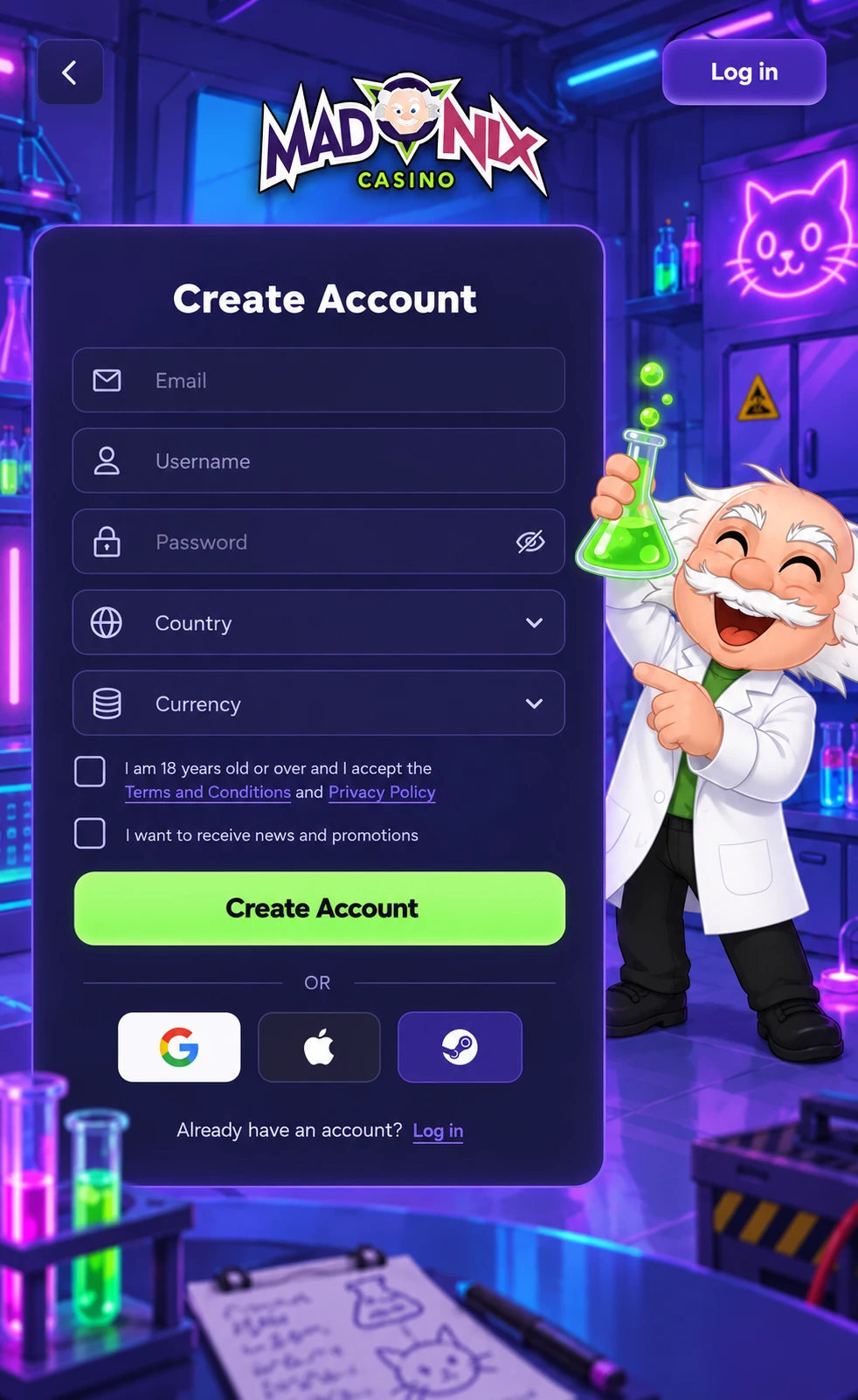
Begin Madnix registration with your contact details ready. Complete each field carefully instead of rushing through selections. Read our terms before accepting them, and make sure the chosen contact channel belongs to you. For an Australian mobile, use international format such as +61 4XX XXX XXX, leaving out the domestic leading zero.
- Type madnix--casino.com directly into your browser.
- Open our registration form.
- Enter an email address or phone number and create a password.
- Select Australian dollars and Australia.
- Confirm adult eligibility and accept our terms.
- Enter our confirmation code or follow the link, then sign in.
Check our web address before submitting personal information. Fake copies exist, so compare every character rather than relying on familiar colours or logos. A saved message, search result or shared link deserves the same scrutiny. If an address looks different, stop entering details and type our domain directly into the browser again.
Data You Provide
Our form collects contact and access information first. Full personal particulars come during identity checks, keeping these stages distinct. Read each selection before submitting it, especially settings that affect payments. For players in Australia, choosing the intended currency at this point matters because it cannot be changed later. Use this summary while preparing your details.
| Data | When We Ask | Requirement |
|---|---|---|
| Email or phone | Sign-up | 6-digit code; valid for 15 minutes |
| Password | Sign-up | At least 8 characters; 1 letter and 1 number |
| Currency | Sign-up | 1 currency per account |
| Country | Sign-up | 1 country per account |
| Name and date of birth | Verification | Legal name; adult eligibility |
| Address | Verification | Proof no older than 3 months |
Differences between submitted details and supporting records need resolving before identity checks can be completed. Review spelling, birth details and residential information carefully. Explain an error through support rather than creating another profile. Accurate entries help us connect supplied records with the person who opened the profile, without relying on someone else’s contact or payment details.
Madnix Casino Account Verification
Identity checks follow Madnix registration and establish who holds your profile. We require ID verification within 72 hours of opening it. Prepare early rather than waiting until a withdrawal is planned. This process connects personal information with supporting evidence, so names and other particulars must agree across submitted records.
Players in Australia can prepare a valid Australian passport or driver licence as photo ID. An expired document does not meet our requirement. For address evidence, prepare a recent utility bill or bank statement. Photograph records clearly, keeping edges visible and text readable. Avoid glare, cropped corners or blurred images.
Completing Madnix registration does not replace this identity review. Verification is required once, before the first withdrawal, and review takes from a few hours to 3 business days. Keep requested material ready during that period. Read any follow-up request carefully and supply relevant information through the verification process.
Steps After Registration
After Madnix registration, take a moment to organise your next steps rather than moving straight into play. Review personal entries, decide what spending feels comfortable and understand the conditions attached to any offer. A deliberate start keeps practical checks separate from decisions made during a gaming session.
- Sign in and review your profile. Check saved details against personal records. Resolve errors before proceeding.
- Consider our welcome offer. Once you have completed all the steps, you can take our welcome bonus: 150% up to A$160 + 225 Free Spins across the first 3 deposits. Full conditions are in the bonus section of madnix--casino.com.
- Keep the first deposit within budget. Choose an affordable amount without drawing on money reserved for essentials.
- Explore a few games. Read their rules before playing and become familiar with controls. Begin with a small selection rather than rushing between titles.
- Set personal spending and time boundaries. Visit our responsible gaming page. Decide when a session ends before starting it.
Keep the purpose of Madnix registration in perspective: gambling is entertainment, never income. Stop when planned spending or time runs out, regardless of results. Players in Australia can contact Gambling Help Online for gambling support. Seeking help is a practical response when play stops feeling manageable.
Madnix Casino Account Security
Protect access after Madnix registration by keeping sign-in details private. A shared device needs particular care because another person could use an open session. Separate personal credentials from everyday messages, and make security part of every visit rather than something considered only after a problem appears.
- Choose a strong, unique password.
- Never share confirmation codes.
- Sign out when using shared devices.
- Type madnix--casino.com yourself.
- Keep contact details current.
We never ask for your password by message. Treat requests for that information as a warning and stop responding. Review unexpected communications carefully before following links or sending personal material. If someone else has accessed your inbox or phone, secure that contact channel as well as your gaming profile.
Troubleshooting Madnix Casino Registration
A stalled Madnix registration can result from a mistyped contact, an undelivered code or a password that fails our requirements. Wrong country or currency selections also need attention before submission. Underage applicants cannot proceed, and an existing profile is not a reason to open another. Identify which stage stopped before trying again.
For help with Madnix registration, first recheck entered details, look in junk mail and confirm the selected contact is accessible. Follow any displayed instruction without sharing private credentials. If trouble continues, email support@madnix--casino.com with the step involved, what appeared onscreen, and your device and browser. Describe any error text accurately so we can understand the issue. Never send a password.